
The idea
For some time I wanted a personal assistant on Telegram. I wanted to write to it during the day, but I also wanted it to write to me first, for example to remind me of something or to send me a short newsletter in the morning. And since I’m often out, I wanted to send it voice notes instead of typing.
The problem was where to run it. I already pay for the LLM API, and paying also for a VPS every month, for something that only I use, didn’t make much sense to me. Serverless was not a good option either. I already have a Telegram bot for my expenses, built with LangChain and deployed on Cloud Run, and it’s not nice to use: if nobody uses it for a while and I send a message I have to wait for the container cold start before I get an answer. For an assistant that has to send me a message at 7am, this doesn’t work.
At some point I realised that my phone is always on and always connected, and it has more CPU and RAM than the cheapest VPS. The assistant doesn’t need much compute anyway, because the LLM runs on the provider’s servers, and most of the time the gateway is just waiting for messages from Telegram. So I decided to try to run it on the phone.
What I use it for
Nanobot is a small, open-source agent framework. It speaks Telegram out of the box, and I can change the model, add tools or wire in scripts just by editing its config. Swapping models is a one-line change. The installer defaults to gpt-4.1-mini, and right now I’m using luna-6, which is cheap and powerful.
Day to day, it does three things for me:
- Voice notes on the go. When I’m out, I mostly send it voice notes in Italian instead of typing. Whisper turns them into text and the model answers as if I’d written the message.
- Reminders. I tell it what to remind me about and when, and it writes to me at the right time. This is the part that needed an always-on process, not a function that wakes up on request.
- A morning newsletter. Every morning it sends me a short, personalised digest. Again, it’s the bot starting the conversation, not me.
It also comes with a web UI, so I can open 127.0.0.1:8765 in the phone’s browser to chat with the same assistant, and to check or change its config.
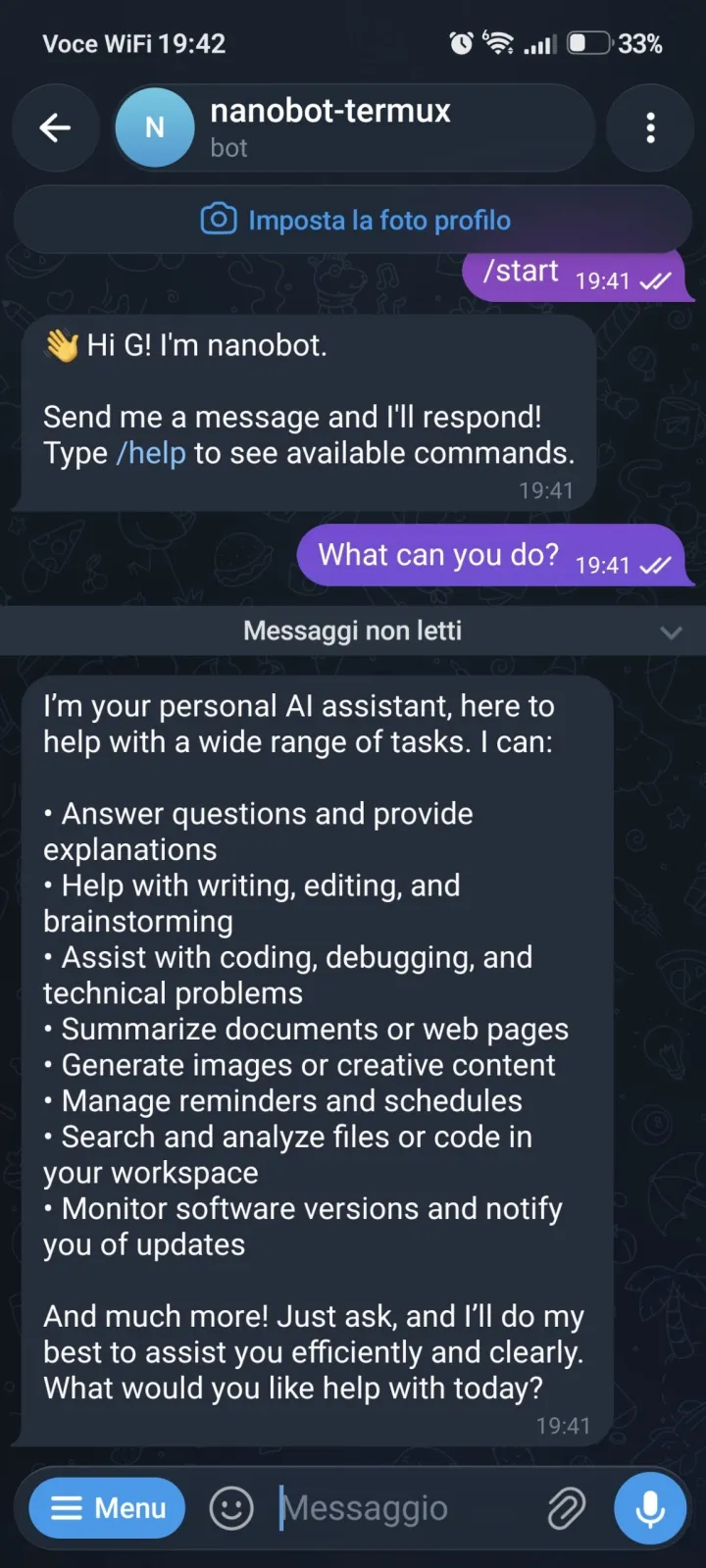
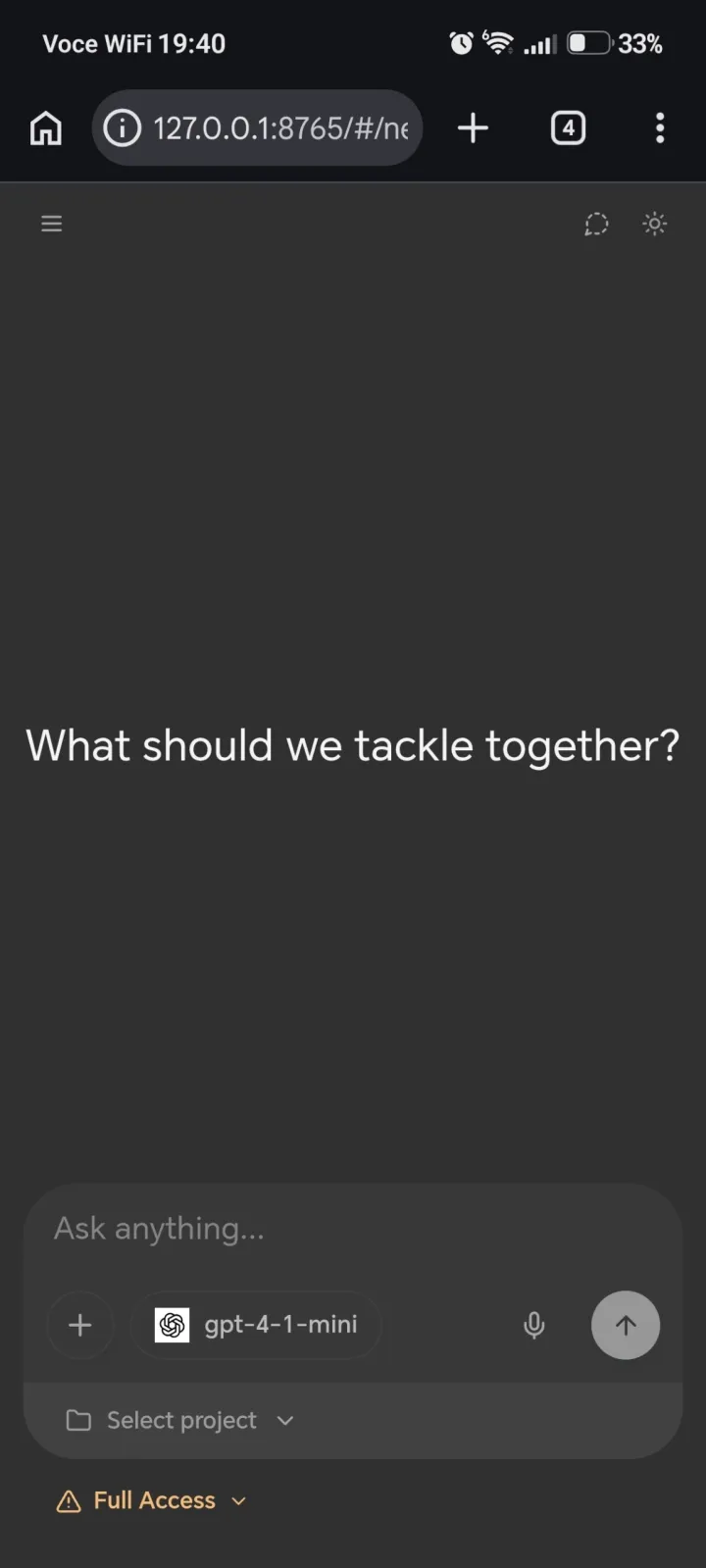
Since I’m the only user, I could accept the bot missing a message now and then. In practice it hasn’t.
How it works
Everything runs as normal Android apps, with no rooting and no virtual machine. The one thing to keep in mind is that Android is strict about apps running in the background, which comes up again later.
- Telegram Messages to and from you
- Nanobot gateway
Python · virtualenv ·
nanobot gateway - Debian ARM64
proot-distro— Linux userspace, not a VM - Termux ARM64 · tmux · boot scripts · logs
- Android OEM battery policy · boot delivery · background limits
Termux is an Android app that gives you a Linux-like shell and a package manager (pkg). As far as Android is concerned, Termux is just another app, subject to the same battery and background rules as everything else.
proot, through proot-distro, takes a folder on disk and makes it look like the root of a normal Linux system. proot-distro login debian drops me into a regular Debian shell, with apt, glibc and /root. It’s not a virtual machine, and it’s a bit slower than a real Linux box, but a chat bot doesn’t notice.
Debian is where Python and Nanobot live. This is the key choice. Installing Nanobot with Termux’s own Python failed for me, because some of its dependencies have no ready-made packages for Android. Inside Debian they install like on any Linux machine, so pip install nanobot-ai just works.
tmux holds the gateway’s session so it keeps running after I close the terminal, and lets me attach later to see what it’s doing.
A supervisor loop (nanobot-loop) enters Debian, runs nanobot gateway, logs everything, and if the gateway exits for any reason, waits ten seconds and starts it again. It’s a dozen lines of bash instead of systemd, which isn’t available here.
Termux:Boot is a Termux add-on that runs scripts in ~/.termux/boot/ when the phone finishes booting. Mine starts the loop.
The LLM provider runs the chat model, and OpenAI’s Whisper handles transcription. Telegram is the interface, and the gateway long-polls the Bot API, so there’s no inbound port, no webhook and no public IP needed.
Put together, a message travels like this: Telegram → long poll from the gateway on the phone → (Whisper, if it’s a voice note) → the model → reply back through the Bot API. Scheduled jobs like reminders and the newsletter skip the first step and start from the gateway.
These are the files that matter:
| Path | What it is |
|---|---|
/root/nanobot-env | Python venv with nanobot (inside Debian) |
/root/.nanobot/config.json | Nanobot config, with keys (mode 600) |
~/bin/nanobot-ctl | Control command: start, stop, status, logs, update, debug |
~/bin/nanobot-loop | Runs the gateway and restarts it when it exits |
~/.termux/boot/00-start-nanobot | What Termux:Boot runs at startup |
~/nanobot-logs/ | setup.log, boot.log and gateway.log |
Setting it up
I packaged the whole setup into a repo: gianfrancodemarco/nanobot-android-termux. It takes three steps.
1. Install Termux and Termux:Boot
Install both APKs from the same v0.8.1-boot-fix release: Termux first, then Termux:Boot, then open each app once. They have to come from the same release because Android only lets a Termux add-on talk to Termux if both are signed with the same key. Why this fork and not the official Termux:Boot is in Troubleshooting.
Then check you’re on 64-bit:
uname -m                      # must print aarch64
dpkg --print-architecture     # must print aarch64
And allow Termux to run in the background in your battery settings. On MagicOS that’s Settings → App launch → Termux: turn off automatic management and allow background activity. Every manufacturer names this differently, but you need it, or the bot stops answering as soon as you switch apps.
2. Run the installer
In Termux:
pkg update -y && pkg install -y git tmux
tmux new -s setup
Then, inside tmux:
git clone https://github.com/gianfrancodemarco/nanobot-android-termux.git
cd nanobot-android-termux
./setup.sh
Running it inside tmux means a dropped Termux session doesn’t kill the install halfway through. The script asks for your OpenAI API key and Telegram bot token (from @BotFather), and everything stays on the phone.
Here’s what it does:
- Installs
proot-distro,tmux,gitandcurlin Termux. - Installs Debian if it’s missing.
- Creates
/root/nanobot-envinside Debian, preferring Python 3.12 or 3.11 when available, and installsnanobot-ai. It also pinscryptography<47, which crashes under proot in newer versions. - Writes
/root/.nanobot/config.jsonfrom the example and fills in your keys. - Installs
nanobot-ctl, the loop and the Termux:Boot entry, and puts~/binon yourPATH.
It’s safe to run again: it keeps your config and keys, and reinstalls the scripts.
If you’d rather do it by hand
The core of it, without the script:
# In Termux
pkg install -y proot-distro tmux
proot-distro install debian
proot-distro login debian

# Now in Debian
apt update
apt install -y python3 python3-venv python3-pip git curl build-essential
python3 -m venv /root/nanobot-env
source /root/nanobot-env/bin/activate
python -m pip install --upgrade pip
python -m pip install --only-binary=:all: rapidfuzz "cryptography<47"
python -m pip install nanobot-ai
nanobot onboard
Create the venv after proot-distro login debian. Termux and Debian are separate filesystems, so a venv created on the Termux side doesn’t exist from Debian’s point of view.
3. Start it
~/bin/nanobot-ctl start
Open the bot on Telegram and send /start. From now on, Termux:Boot starts it again after every reboot.
nanobot-ctl is the single entry point for everything else:
| I want to… | Run |
|---|---|
| Start or restart the bot | nanobot-ctl start |
| Stop it | nanobot-ctl stop |
| Check if it’s running | nanobot-ctl status |
| Watch the logs | nanobot-ctl logs |
| See the live session | nanobot-ctl attach (leave with Ctrl+B, then D) |
| Update Nanobot | nanobot-ctl update |
| See why it crashes | nanobot-ctl debug |
| Edit the config | nanobot-ctl config, then nanobot-ctl start |
Run it from plain Termux, not from inside Debian. stop kills every proot process, which also catches any gateway you started by hand, so there’s never more than one bot polling Telegram.
The pieces in detail
The config
Everything lives in /root/.nanobot/config.json. The installer’s version looks like this:
{
  "agents": { "defaults": { "model": "gpt-4.1-mini", "provider": "openai" } },
  "providers": { "openai": { "apiKey": "PASTE_YOUR_OPENAI_API_KEY_HERE" } },
  "channels": { "telegram": { "enabled": true, "token": "PASTE_YOUR_TELEGRAM_BOT_TOKEN_HERE" } },
  "transcription": {
    "enabled": true,
    "provider": "openai",
    "model": "whisper-1",
    "language": "it",
    "maxDurationSec": 120,
    "maxUploadMb": 25
  }
}
Before you give the bot any tools, decide who can talk to it. If you leave out allowFrom on the Telegram channel, Nanobot runs in pairing-only mode and you approve your own pairing code, which is better than a bot anyone can find and use. Look at which tools it can use before you turn on shell or filesystem access, too: this is a process with network access running on your phone.
Voice notes
Telegram voice messages reach Nanobot as audio files. The gateway sends them to the transcription provider and passes the text to the model, so from the model’s point of view, a voice note is just a message.
That’s configured in the top-level transcription block, not under the Telegram channel. I set language to it because almost all my voice notes are in Italian, and Whisper is more accurate when it doesn’t have to guess. maxDurationSec and maxUploadMb are there so a ten-minute rant doesn’t turn into a surprise bill. It reuses the key from providers.openai, so there’s nothing new to set up. One thing to know: API usage, audio included, is billed separately from a ChatGPT subscription.
The supervisor loop
nanobot-loop runs inside a detached tmux session called nanobot-host:
#!/data/data/com.termux/files/usr/bin/bash
set +e
export PATH="/data/data/com.termux/files/usr/bin:${PATH:-}"
export PROOT_NO_SECCOMP=1

LOG="$HOME/nanobot-logs/gateway.log"
mkdir -p "$HOME/nanobot-logs"

while true; do
  echo "[$(date)] start nanobot gateway" | tee -a "$LOG"
  proot-distro login debian -- /bin/bash -lc \
    'source /root/nanobot-env/bin/activate && exec nanobot gateway' 2>&1 | tee -a "$LOG"
  echo "[$(date)] gateway exit rc=${PIPESTATUS[0]} (132=SIGILL, try: nanobot-ctl debug); restart in 10s" | tee -a "$LOG"
  sleep 10
done
Everything the gateway prints goes to gateway.log, along with its exit code when it stops, and you can watch it live with nanobot-ctl attach.
If the gateway loses the network, hits a bad API response or crashes, it’s back ten seconds later. That’s the whole reliability story, and so far it’s been enough.
Starting on boot
~/.termux/boot/00-start-nanobot is what Termux:Boot runs:
#!/data/data/com.termux/files/usr/bin/bash
mkdir -p "$HOME/nanobot-logs"
exec >>"$HOME/nanobot-logs/boot.log" 2>&1
echo "===== boot $(date) ====="
termux-wake-lock 2>/dev/null || true
sleep 15
"$HOME/bin/nanobot-ctl" start
It logs to boot.log, tries to take a wake lock, waits fifteen seconds for the network and the rest of the phone to settle, and starts the bot. To check it worked after a reboot, look for a fresh ===== boot line in ~/nanobot-logs/boot.log.
Living with it
I’ve used it every day for a couple of weeks, with the phone in my pocket and the screen off for hours at a time.
Battery. I was worried about this, since a process running all day in the background sounds like exactly what Android tries to stop. After a couple of weeks of normal use, Termux’s share of the battery is negligible. The gateway spends almost all its time waiting on a Telegram long poll, and the real work happens on the LLM provider’s servers.
Reliability. This isn’t server-grade uptime. Android can still kill the process when memory is low, after a cleaner app runs, or after a system update changes the rules. The battery settings and the restart loop make it much less likely, not impossible. So far, though, I haven’t had any downtime.
Updates. nanobot-ctl update stops the gateway, upgrades nanobot-ai (keeping the cryptography pin), prints the old and new versions, and starts it again. Config and keys aren’t touched. For the scripts themselves, git pull && ./setup.sh in the repo.
Secrets. Never publish your config.json as is: it has your API key and bot token in it. Share a copy with placeholders.
Troubleshooting
Most of the time I spent on this went into the problems below, not into Nanobot. They’re specific to Android, and some to my phone, so your mileage may vary.
Pip fails in Termux with Rust or wheel errors
My first attempt was pip install nanobot-ai straight into Termux’s Python. It died while building watchfiles:
Python reports SOABI: cpython-314-arm-linux-androideabi
Computed rustc target triple: arm-unknown-linux-androideabi
Target triple not supported by rustup: arm-unknown-linux-androideabi
Forcing binary wheels didn’t help either, since there was no rapidfuzz wheel for that platform. Two things were wrong. First, note the arm, not aarch64: see the next item. Second, some dependencies have no ready-made packages for Termux’s Python. Install Nanobot in Debian instead, where they install normally.
uname -m prints armv8l
Android said my phone supports arm64-v8a, but the Termux I had installed was the 32-bit build:
uname -m                      # armv8l
dpkg --print-architecture     # arm
Every confusing pip error I hit goes back to this. Don’t try to make it work. Back up anything you care about (uninstalling Termux wipes its data) and reinstall the ARM64 or universal build. Both commands should print aarch64 before you go any further. The installer checks this and stops if they don’t.
The bot stops answering when Termux isn’t on screen
My first idea was tmux, and it made no difference. tmux keeps a session alive after you leave the terminal, but it has no say over whether Android lets Termux keep running.
What fixed it was the OEM background setting: on MagicOS, App launch → Termux, automatic management off, background activity allowed, plus battery optimization off for Termux. The menus are named differently on every manufacturer, and sometimes between versions of the same one. dontkillmyapp.com has the steps for most brands.
People also suggest termux-wake-lock. The boot script tries it, but I haven’t tested whether it actually matters on my phone, and it does cost battery.
Termux:Boot doesn’t start anything after a reboot
This one took the longest. The official Termux:Boot 0.8.1 was installed and enabled, and when I triggered its receiver by hand, it ran my script every time:
am broadcast -a android.intent.action.BOOT_COMPLETED -n com.termux.boot/.BootReceiver
After a real reboot, nothing happened. I stripped the script down to a single line writing a timestamp, rebooted, waited, and the log still only had the timestamp from my manual test. logcat, dumpsys and cmd package either showed nothing useful or were blocked by permissions.
I don’t know why. My guess is that the official version doesn’t get along with Android 16 on this phone. The oswaldlow/termux-boot fork, tag v0.8.1-boot-fix, changes how the boot start works, and with it the bot came back on its own after a reboot. It’s signed with a different key from the official build, so you need the matching Termux from the same release, which is why the setup starts with that pair.
On another phone, the official Termux:Boot may well work fine. Whichever you use, open the Termux:Boot app once after installing it, or it never registers.
The gateway dies with rc=132 (SIGILL)
rc=132 in gateway.log means the gateway crashed while loading one of its Python packages, which doesn’t work under proot. The known case is cryptography 50.x, so setup and nanobot-ctl update pin it below 47, and the installer prefers Python 3.12 or 3.11 for the same reason.
If it happens with something else, run nanobot-ctl debug. It runs the gateway in the foreground with Python’s faulthandler, and the site-packages/<package>/ lines in the crash dump tell you which package to pin.
The gateway restarts every ten seconds
The loop is doing its job, but something makes the gateway exit right away. Run nanobot-ctl debug and read the error. If it’s about Telegram, test the token:
curl -s "https://api.telegram.org/bot<TOKEN>/getMe" # should return "ok":true
Address already in use
nanobot-ctl stop, which kills every proot process, then nanobot-ctl start.Voice notes are ignored or not transcribed
transcription block had enabled: true but provider, model and language were all null: switched on, with nothing configured. There was also a leftover transcriptionProvider: groq on the Telegram channel, and I’ve never had a Groq key. Fill in the top-level block, look for leftovers like that, and restart with nanobot-ctl start. If it still doesn’t work, check gateway.log, and remove tokens before you paste it anywhere.pip fails installing python-telegram-bot on first start
python-telegram-bot[socks,webhooks] and failed partway through. Running it again fixed it. Try again before you start debugging.proot behaves strangely
pkg upgrade -y proot proot-distro. Don’t do a full pkg upgrade from inside a running script, though: it replaces bash under the running process and kills the session, which is why the installer only runs pkg update.What’s next
The proactive side is what I like most, and it’s where I want to keep going: more tools and scheduled jobs on the same process, as far as Android’s background rules allow. I’d also like a proper health check instead of relying only on the restart loop, and a safe way to back up the config.
The next concrete step is moving my expense tracker over to this setup and turning off the Cloud Run version. That’s one less thing to pay for, and no more waiting for a cold start every time I log an expense. If that goes well, other small personal services could follow.
Wrapping up
What I wanted was simple: an assistant on Telegram that I control, that understands my voice notes, and that sometimes talks to me first. It turns out the phone I already carry is a perfectly good host for that. Termux plus Debian under proot gives you a real Linux userspace, a dozen lines of bash give you a supervisor, and Termux:Boot brings it back after a reboot.
If you want to try it, clone nanobot-android-termux, run ./setup.sh, whitelist Termux in your battery settings, and keep the Troubleshooting section handy. What worked on my phone might need a nudge on yours.